

Рефакторинг моего Obsidian: как я перестроил хранилище после предыдущей статьи
Предысловие
Какое-то время назад я выкладывал статью на Хабр про свое obsidian хранилище.
Я получил хороший фидбэк и некоторые идеи. Также я понял, что довольно большая часть моего obsidian нуждается в оптимизации и структуризации. В итоге нашел свободный выходной, чтобы немного перестроить хранилище. Я все это сделал и тут расскажу, как теперь выглядит мой obsidian.
Кроме простой структуризации и удаления лишнего, я также провел некоторые махинации над кодом dataviewjs своей библиотеки книг и доделал свою домашнюю страницу, добавив интеграцию со своей основной библиотекой и поработав на css составляющей. В общем-то были еще некоторые изменения, но об этом всем будет далее.
Что же нового?
Общая структура папок
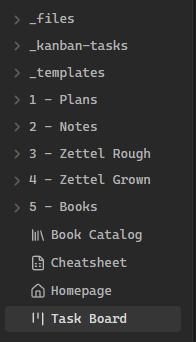
Ниже будет название папки в виде заголовка и описание для чего нужна папка. Папки с _ в начале — это папки служебного назначения.
_files
Здесь хранятся все файлы, которые используются в заметках (фото, рисунки и т.д.). В настройках в Obsidian можно поставить чтобы все не .md файлы складывались туда.
_kanban-tasks
Здесь хранятся заметки, которые создаются Kanban. Используем Kanban Task Temp. (применяется автоматически). В Kanban можно нажать на задачу и выбрать “Attach Note”, тогда создается новая заметка, где можно более подробно расписать задачу.
_templates
Здесь хранятся шаблоны для разных типов файлов. (Book, Note, Plan, Zettel, Kanban Task шаблоны). Для шаблонов советую полезный плагин Templater.
1 — Plans
Здесь хранятся все планы. Используем Plan Temp.
2 — Notes
Здесь хранятся все полезные заметки, записи и тд, которые не относятся к каким-то конкретным областям знаний. Используем Note Temp.
3 — Zettel Rough
Папка для сырых заметок. Начинаю писать здесь. Если заметка неполная, требует доработки или я ещё не уверен в её конечной ценности — она остается здесь. Используем Zettel Temp
4 — Zettel Grown
Здесь хранятся все заметки для моей главной базы знаний. То есть сюда я записываю идеи или материалы, которые могут послужить в будущем и несут ценную информацию.
Главный вопрос: «Хотел бы я, чтобы эта информация держалась у меня в голове долгое время?». Если «да» — информация ценна, и её нужно записать.
Когда заметка становится самодостаточной и ценной, я перемещаю её из Rough Notes в Grown Notes. После переноса из Zettel Rough меняем #rough на #grown.
5 — Books
Здесь хранятся все прочитанные книги. Сначала создаётся файл с названием книги, вставляется шаблон и заполняется. В этом же файле можно писать заметки по книге. Используем Book Temp.
Остальные файлы
-
Cheatsheet (этот файл): исчерпывающая шпаргалка по системе
-
Homepage: домашняя страница с самыми важными ссылками
-
Task Board: Kanban для отложенных дел и заметок
Основные горячие клавиши
-
Alt+S— вставка шаблона -
Alt+Q— вставка callout -
Ctrl+O— открыть quick switcher -
Ctrl+P— открыть command palette -
Ctrl+E— сменить current view -
Ctrl+ЛКМ— открыть ссылку в новой вкладке -
Ctrl+Shift+F— поиск во всех файлах -
Ctrl+↑— переместить строку вверх -
Ctrl+↓— переместить строку вниз -
Alt+A— свернуть все списки и заголовки -
Alt+D— развернуть все списки и заголовки -
Ctrl+Del— очистить Canvas в Excalidraw
Пример одного из шаблонов
Tags: #zettel #rough
File Links:
# {{Title}}
Заполнение файла стало значительно проще и быстрее, по сравнению с тем что было раньше: быстро написал дополнительно пару тегов, может быть добавил ссылки на другие файлы в хранилище.
Каталог книг
Каталог выглядит таким образом. На странице можно искать книги по жанрам, статусам и по названию:
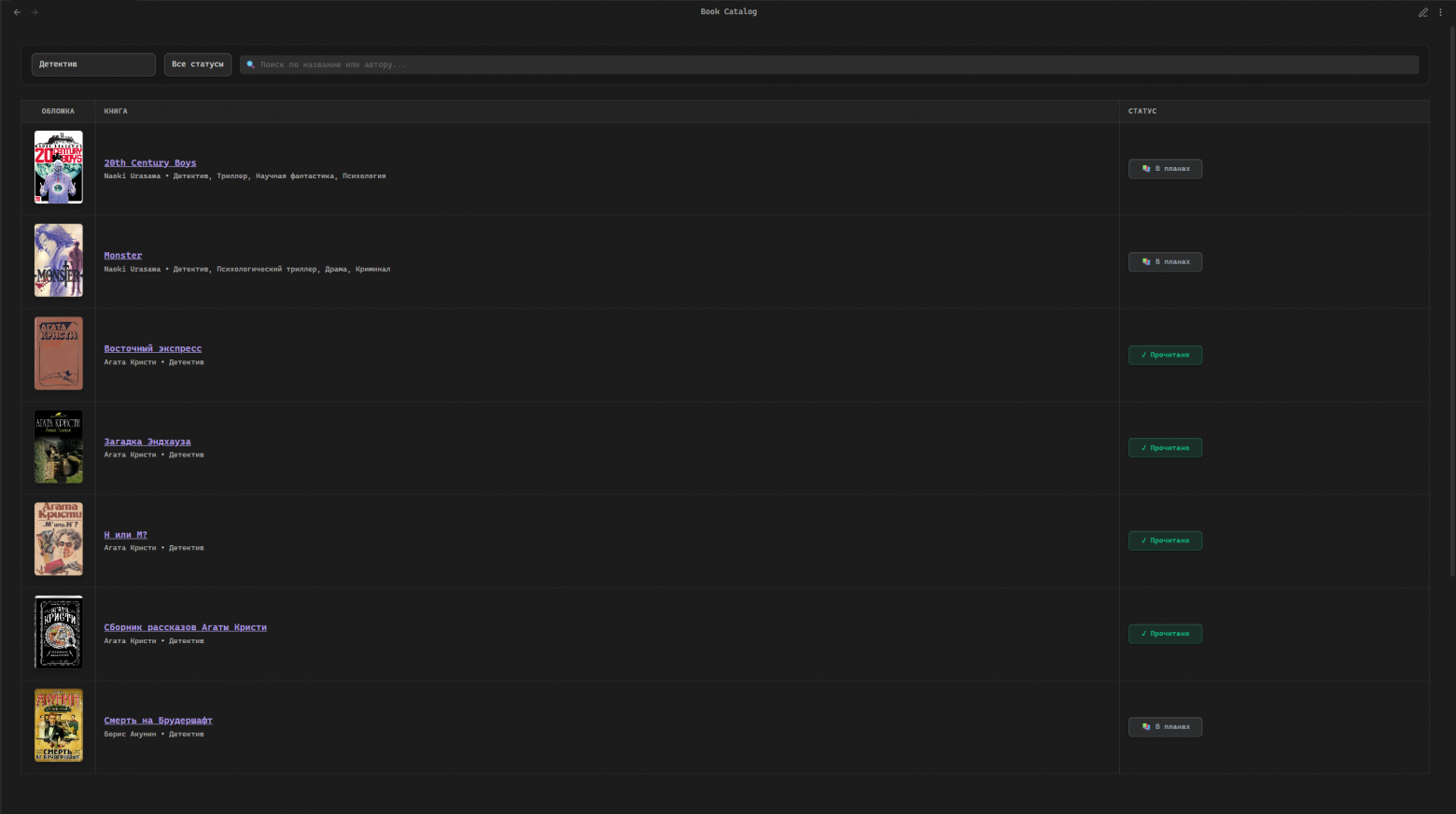
Ниже полный блок кода каталога. Его можно просто скопировать в файл и он будет смотреть все книги в папке “5 — Books”.
Код каталога книг
const bookPages = dv.pages('"5 - Books"').where(p => p.title);
const container = this.container;

const style = document.createElement("style");
style.textContent = `
    .book-table {
        width: 100%;
        border-collapse: separate;
        border-spacing: 0;
        font-family: inherit;
        margin-top: 0.5rem;
        font-size: 14px;
    }
    .book-table th {
        background: rgba(255, 255, 255, 0.03);
        color: var(--text-muted, #9ca3af);
        padding: 10px 14px;
        border-bottom: 1px solid rgba(255, 255, 255, 0.08);
        font-weight: 600;
        text-align: left;
        font-size: 12px;
        text-transform: uppercase;
        letter-spacing: 0.05em;
    }
    .book-table th:first-child,
    .book-table td:first-child {
        width: 120px; /* Было 100px */
        text-align: center;
    }
    .book-table td {
        padding: 12px 14px;
        border-bottom: 1px solid rgba(255, 255, 255, 0.05);
        color: var(--text-normal, #e5e7eb);
        vertical-align: middle;
    }
    .book-table tr {
        transition: background-color 0.15s ease;
    }
    .book-table tr:hover {
        background: rgba(139, 92, 246, 0.04) !important;
    }
    .filter-container {
        background: rgba(0, 0, 0, 0.15);
        border-radius: 10px;
        padding: 0.8rem 1rem;
        margin-bottom: 1.5rem;
        border: 1px solid rgba(255, 255, 255, 0.08);
        display: flex;
        gap: 0.8rem;
        align-items: center;
        flex-wrap: wrap;
    }
    .filter-select, .filter-search {
        padding: 8px 12px;
        border-radius: 8px;
        border: 1px solid rgba(255, 255, 255, 0.12);
        background: var(--background-secondary, #1e1e24);
        color: var(--text-normal, #e5e7eb);
        font-size: 13px;
        outline: none;
        transition: all 0.2s ease;
        height: 38px;
        box-sizing: border-box;
        font-family: inherit;
    }
    .filter-select:hover, .filter-search:focus {
        border-color: rgba(167, 139, 250, 0.5);
        box-shadow: 0 0 0 2px rgba(139, 92, 246, 0.15);
    }
    .filter-search {
        flex: 1;
        min-width: 220px;
    }
    .book-title-link {
        color: var(--text-normal, #f3f4f6);
        text-decoration: none;
        font-weight: 600;
        font-size: 15px;
        transition: color 0.2s;
        line-height: 1.3;
    }
    .book-title-link:hover {
        color: #a78bfa;
    }
    .book-meta-text {
        font-size: 12px;
        color: var(--text-muted, #9ca3af);
        margin-top: 4px;
    }
    .status-dropdown {
        padding: 4px 8px;
        border-radius: 6px;
        font-size: 12px;
        font-weight: 600;
        border: 1px solid transparent;
        outline: none;
        cursor: pointer;
        transition: all 0.2s;
        width: 120px;
        text-align: center;
        height: 32px;
        box-sizing: border-box;
        font-family: inherit;
    }

    .book-cover-img {
        width: 80px;
        height: 120px;
        border-radius: 6px;
        object-fit: cover;
        box-shadow: 0 3px 8px rgba(0,0,0,0.25);
        border: 1px solid rgba(255, 255, 255, 0.08);
        transition: transform 0.2s, box-shadow 0.2s;
        cursor: pointer;
        display: inline-block;
    }
    .book-cover-img:hover {
        transform: translateY(-2px);
        box-shadow: 0 6px 12px rgba(0,0,0,0.35);
    }

    @media (max-width: 600px) {
        .book-table th, .book-table td {
            padding: 8px 6px;
            font-size: 12px;
        }
        .book-table th:first-child,
        .book-table td:first-child {
            width: 85px; /* Было 70px */
        }
        .book-cover-img {
            width: 60px;
            height: 90px;
        }
        .book-title-link {
            font-size: 13px;
        }
        .book-meta-text {
            font-size: 10px;
        }
        .status-dropdown {
            width: 95px;
            font-size: 11px;
            height: 28px;
            padding: 2px 2px;
        }
        .filter-container {
            padding: 0.6rem;
            flex-direction: column;
            align-items: stretch;
            gap: 0.5rem;
        }
        .filter-select, .filter-search {
            width: 100%;
        }
    }
`;
document.head.appendChild(style);

const filterContainer = document.createElement("div");
filterContainer.className = "filter-container";

const genreSelect = document.createElement("select");
genreSelect.className = "filter-select";
const allOption = document.createElement("option");
allOption.textContent = "Все жанры";
allOption.value = "";
genreSelect.appendChild(allOption);

const allGenres = new Set();
for (let p of bookPages) {
    if (p.genre) {
        const genres = Array.isArray(p.genre) ? p.genre : [p.genre];
        genres.forEach(g => g && allGenres.add(g));
    }
}
for (let genre of Array.from(allGenres).sort()) {
    const opt = document.createElement("option");
    opt.textContent = genre;
    opt.value = genre;
    opt.style.background = "var(--background-secondary, #1e1e24)";
    genreSelect.appendChild(opt);
}
filterContainer.appendChild(genreSelect);

const statusSelect = document.createElement("select");
statusSelect.className = "filter-select";
const statusOptions = [
    { value: "", text: "Все статусы" },
    { value: "reading", text: "Читаю" },
    { value: "completed", text: "Прочитано" },
    { value: "planned", text: "В планах" }
];
statusOptions.forEach(o => {
    const opt = document.createElement("option");
    opt.textContent = o.text;
    opt.value = o.value;
    opt.style.background = "var(--background-secondary, #1e1e24)";
    statusSelect.appendChild(opt);
});
filterContainer.appendChild(statusSelect);

const searchInput = document.createElement("input");
searchInput.type = "text";
searchInput.className = "filter-search";
searchInput.placeholder = "🔍 Поиск по названию или автору...";
filterContainer.appendChild(searchInput);

container.appendChild(filterContainer);

function determineBookStatus(page) {
    if (page.status) return page.status;
    const today = new Date().toISOString().split('T')[0];
    if (page.date_ended && page.date_ended <= today) return "completed";
    if (page.date_started) return "reading";
    return "planned";
}

function applyStatusStyle(selectElement, status) {
    if (status === "completed") {
        selectElement.style.background = "rgba(16, 185, 129, 0.12)";
        selectElement.style.color = "#10b981";
        selectElement.style.borderColor = "rgba(16, 185, 129, 0.25)";
    } else if (status === "reading") {
        selectElement.style.background = "rgba(139, 92, 246, 0.12)";
        selectElement.style.color = "#a78bfa";
        selectElement.style.borderColor = "rgba(139, 92, 246, 0.25)";
    } else {
        selectElement.style.background = "rgba(156, 163, 175, 0.12)";
        selectElement.style.color = "#9ca3af";
        selectElement.style.borderColor = "rgba(156, 163, 175, 0.25)";
    }
}

async function updatePageProperty(page, property, value) {
    try {
        const file = app.vault.getAbstractFileByPath(page.file.path);
        if (!file) return false;
        await app.fileManager.processFrontMatter(file, (fm) => {
            if (value === undefined || value === "") { delete fm[property]; }
            else { fm[property] = value; }
        });
        page[property] = value;
        return true;
    } catch (e) { console.error(e); return false; }
}

async function removePageProperty(page, property) {
    try {
        const file = app.vault.getAbstractFileByPath(page.file.path);
        if (!file) return false;
        await app.fileManager.processFrontMatter(file, (fm) => { delete fm[property]; });
        delete page[property];
        return true;
    } catch (e) { console.error(e); return false; }
}

function renderTable(selectedGenre = "", selectedStatus = "", searchTerm = "") {
    const oldTable = container.querySelector(".book-table");
    if (oldTable) oldTable.remove();

    const table = document.createElement("table");
    table.className = "book-table";

    const header = table.insertRow();
    ["Обложка", "Книга", "Статус"].forEach(t => {
        const th = document.createElement("th");
        th.textContent = t;
        header.appendChild(th);
    });

    for (let p of bookPages) {
        const genreMatch = !selectedGenre || (p.genre && ((Array.isArray(p.genre) && p.genre.includes(selectedGenre)) || p.genre === selectedGenre));
        const actualStatus = determineBookStatus(p);
        const statusMatch = !selectedStatus || actualStatus === selectedStatus;
        const searchMatch = !searchTerm || (p.title && p.title.toLowerCase().includes(searchTerm.toLowerCase())) || (p.author && p.author.toLowerCase().includes(searchTerm.toLowerCase()));

        if (!(genreMatch && statusMatch && searchMatch)) continue;

        const row = table.insertRow();
        row.onclick = (e) => {
            if (!e.target.closest('a') && !e.target.closest('select') && !e.target.closest('input') && !e.target.closest('img')) {
                window.location.href = p.file.path;
            }
        };

        const cellCover = row.insertCell();
        if (p.cover) {
            const img = document.createElement("img");
            img.src = p.cover;
            img.className = "book-cover-img";
            img.onclick = () => window.location.href = p.file.path;
            cellCover.appendChild(img);
        } else {
            const placeholder = document.createElement("div");
            placeholder.className = "book-cover-img";
            placeholder.style.background = "rgba(255, 255, 255, 0.03)";
            placeholder.style.display = "flex";
            placeholder.style.alignItems = "center";
            placeholder.style.justifyContent = "center";
            placeholder.style.fontSize = "24px";
            placeholder.style.border = "1px dashed rgba(255, 255, 255, 0.15)";
            placeholder.innerHTML = "📖";
            placeholder.onclick = () => window.location.href = p.file.path;
            cellCover.appendChild(placeholder);
        }

        const cellInfo = row.insertCell();
        const infoWrapper = document.createElement("div");
        infoWrapper.style.display = "flex";
        infoWrapper.style.flexDirection = "column";

        const link = document.createElement("a");
        link.href = p.file.path;
        link.textContent = p.title || p.file.name;
        link.className = "internal-link book-title-link";

        const metaText = document.createElement("div");
        metaText.className = "book-meta-text";
        const author = p.author || "Автор не указан";
        const genre = Array.isArray(p.genre) ? p.genre.join(", ") : (p.genre || "");
        metaText.textContent = author + (genre ? ` • ${genre}` : "");

        infoWrapper.appendChild(link);
        infoWrapper.appendChild(metaText);
        cellInfo.appendChild(infoWrapper);

        const cellStatus = row.insertCell();
        const sel = document.createElement("select");
        sel.className = "status-dropdown";

        const opts = [
            { value: "planned", text: "📚 В планах" },
            { value: "reading", text: "📖 Читаю" },
            { value: "completed", text: "✓ Прочитано" }
        ];
        opts.forEach(o => {
            const opt = document.createElement("option");
            opt.value = o.value;
            opt.textContent = o.text;
            opt.style.background = "var(--background-secondary, #1e1e24)";
            if (o.value === actualStatus) opt.selected = true;
            sel.appendChild(opt);
        });
        applyStatusStyle(sel, actualStatus);
        cellStatus.appendChild(sel);

        sel.onchange = async () => {
            const newStatus = sel.value;
            applyStatusStyle(sel, newStatus);
            if (newStatus !== actualStatus) {
                let success = await updatePageProperty(p, "status", newStatus);
                if (success) {
                    if (actualStatus === "completed" && newStatus !== "completed") {
                        await removePageProperty(p, "date_ended");
                    } else if (newStatus === "completed") {
                        await updatePageProperty(p, "date_ended", new Date().toISOString().split('T')[0]);
                    }
                    renderTable(genreSelect.value, statusSelect.value, searchInput.value);
                }
            }
        };
    }

    container.appendChild(table);
}

genreSelect.onchange = () => renderTable(genreSelect.value, statusSelect.value, searchInput.value);
statusSelect.onchange = () => renderTable(genreSelect.value, statusSelect.value, searchInput.value);
searchInput.oninput = () => renderTable(genreSelect.value, statusSelect.value, searchInput.value);

renderTable();
Шаблон для книг:
В status может быть planned, completed, reading.
В cover можно просто вставить ссылку на картинку из интернета.
---
title: {{Title}}
cover:
author:
genre:
status: planned
---
Tags: #book
File Links: [[Book Catalog]]
# {{Title}}
Ведение заметок (Kanban плагин)

Тут все быстро — есть 3 списка:
-
ASAP (As soon as possible) — дела которые нужно сделать сейчас
-
Deferred — отложенные дела
-
Done — сделанные дела
Дела просто перетаскиваю из одного списка в другой
Домашняя страница
Страница выглядит подобным образом:
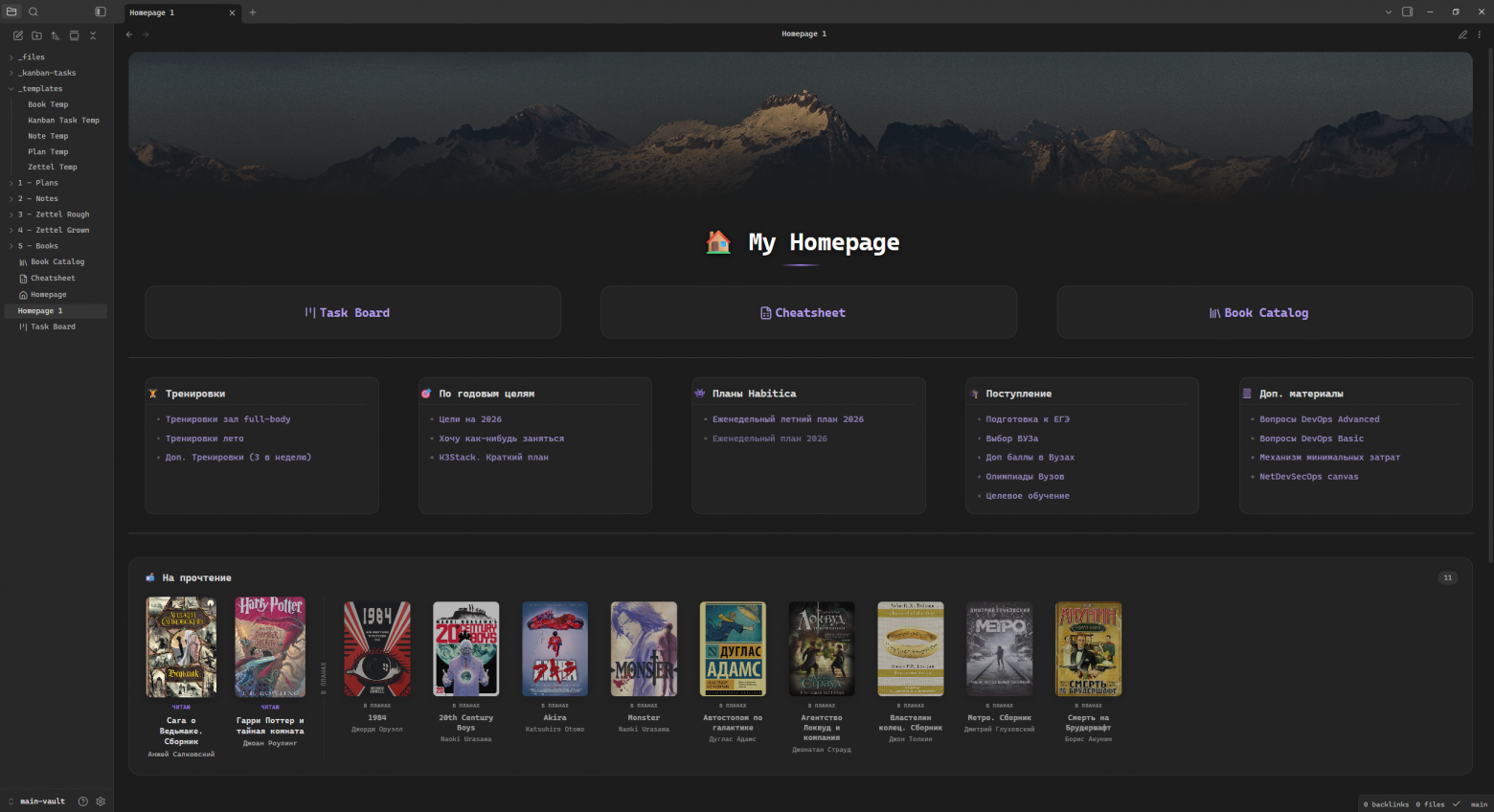
Использую css файл для расположения элементов по странице и разделения их на блоки:
CSS файл для Homepage
.image-embed[alt*="fade-banner"] {
    position: relative;
    display: block;
    width: 100%;
    height: 260px;
    overflow: hidden;
    margin-bottom: 25px;
    border-radius: 16px;
}

.image-embed[alt*="fade-banner"] img {
    width: 100% !important;
    height: 100% !important;
    object-fit: cover !important;
    transition: transform 0.6s cubic-bezier(0.16, 1, 0.3, 1);
}

.image-embed[alt*="fade-banner"]:hover img {
    transform: scale(1.03);
}

.image-embed[alt*="fade-banner"]::after,
.banner-gradient {
    content: "";
    position: absolute;
    inset: 0;
    background: linear-gradient(180deg, transparent 20%, var(--background-primary) 100%);
    pointer-events: none;
}

.dashboard {
    font-family: inherit;
    padding: 10px 25px !important;
    --card-bg: color-mix(in srgb, var(--background-secondary) 88%, black 12%);
    --card-bg-hover: color-mix(in srgb, var(--background-secondary) 80%, black 20%);
}

.dashboard .markdown-preview-section {
    max-width: 100%;
}

.dashboard h1 {
    position: relative;
    z-index: 2;
    text-align: center;
    font-size: 2.6em;
    font-weight: 800;
    letter-spacing: -0.02em;
    margin: -92px 0 34px;
    padding-bottom: 16px;
    color: #ffffff;
    text-shadow: 0 2px 14px rgba(0, 0, 0, 0.55), 0 1px 4px rgba(0, 0, 0, 0.4);
}

.dashboard h1::after {
    content: "";
    position: absolute;
    bottom: 0;
    left: 50%;
    transform: translateX(-50%);
    width: 72px;
    height: 3px;
    border-radius: 3px;
    background: linear-gradient(90deg, transparent, var(--interactive-accent), transparent);
}

.dashboard div>ul {
    list-style: none !important;
    display: flex;
    flex-flow: row wrap;
    column-gap: 40px;
    row-gap: 25px;
    padding-left: 0 !important;
    margin: 0 !important;
}

.dashboard div>ul>li {
    flex: 1 1 260px;
    min-width: 260px;
    background-color: transparent !important;
    border: 1px solid transparent !important;
    border-radius: 12px !important;
    padding: 14px 18px !important;
    box-shadow: none !important;
    transition: all 0.25s cubic-bezier(0.16, 1, 0.3, 1);
}

.dashboard div>ul>li>b,
.dashboard div>ul>li>strong,
.dashboard div>ul>li>h3 {
    display: block;
    font-size: 1.1em;
    font-weight: 650;
    margin-bottom: 12px;
    padding-bottom: 6px;
    color: var(--text-normal);
    border-bottom: 1px solid var(--background-modifier-border);
    transition: color 0.2s ease, border-color 0.2s ease;
}

.dashboard div>ul>li:hover>h3,
.dashboard div>ul>li:hover>b,
.dashboard div>ul>li:hover>strong {
    color: var(--interactive-accent);
    border-color: var(--interactive-accent);
}

.dashboard div>ul>li:has(>h3) {
    background: var(--card-bg) !important;
    border: 1px solid var(--background-modifier-border) !important;
    border-radius: 14px !important;
    padding: 16px 20px !important;
}

.dashboard div>ul>li:has(>h3):hover {
    background: var(--card-bg-hover) !important;
    border-color: var(--interactive-accent) !important;
    box-shadow: 0 8px 20px rgba(0, 0, 0, 0.2);
    transform: translateY(-2px);
}

.dashboard div>ul>li>ul {
    display: flex !important;
    flex-direction: column;
    gap: 6px;
    padding-left: 0 !important;
    list-style: none !important;
}

.dashboard div>ul>li>ul>li {
    background: transparent !important;
    border: none !important;
    padding: 2px 0 !important;
    min-width: auto !important;
    font-size: 0.95em;
    opacity: 0.85;
    transition: opacity 0.2s ease, transform 0.2s ease;
}

.dashboard div>ul>li>ul>li:hover {
    opacity: 1;
    transform: translateX(4px);
}

.dashboard div>ul>li>ul>li a {
    text-decoration: none !important;
    color: var(--text-muted);
    transition: color 0.2s ease;
}

.dashboard div>ul>li>ul>li a:hover {
    color: var(--interactive-accent);
}

.dashboard div.markdown-preview-section>div>ul>li>.list-bullet,
.dashboard.markdown-rendered.show-indentation-guide li>ul::before,
.dashboard.markdown-rendered.show-indentation-guide li>ol::before {
    display: none !important;
}

div.markdown-preview-section>div>ul.has-list-bullet>li {
    padding-left: 0 !important;
}

.dashboard div>ul>li:has(>h2) {
    position: relative;
    background: var(--card-bg) !important;
    border: 1px solid var(--background-modifier-border) !important;
    border-radius: 18px !important;
    padding: 28px 22px !important;
    min-height: 90px;
    display: flex;
    align-items: center;
    justify-content: center;
    text-align: center;
    box-shadow: none;
}

.dashboard div>ul>li:has(>h2):hover {
    background: var(--card-bg-hover) !important;
    border-color: var(--interactive-accent) !important;
    transform: translateY(-4px);
    box-shadow: 0 14px 30px rgba(0, 0, 0, 0.25);
}

.dashboard div>ul>li>h2 {
    font-size: 1.3em;
    font-weight: 700;
    letter-spacing: -0.01em;
    margin: 0 !important;
    padding: 0 !important;
    border: none !important;
    line-height: 1.3;
}

.dashboard div>ul>li>h2 a {
    text-decoration: none !important;
    color: var(--text-normal);
    transition: color 0.2s ease;
}

.dashboard div>ul>li:has(>h2):hover h2 a {
    color: var(--interactive-accent);
}

.reading-section {
    background: var(--card-bg);
    border: 1px solid var(--background-modifier-border);
    border-radius: 18px;
    padding: 22px 24px 26px;
    margin: 8px 0 30px;
}

.reading-section-header {
    display: flex;
    align-items: center;
    justify-content: space-between;
    margin-bottom: 20px;
}

.reading-section-title {
    font-size: 1.05em;
    font-weight: 700;
    color: var(--text-normal);
    display: flex;
    align-items: center;
    gap: 8px;
    margin: 0;
}

.reading-section-count {
    font-size: 0.72em;
    font-weight: 600;
    color: var(--text-muted);
    background: var(--background-modifier-border);
    padding: 3px 11px;
    border-radius: 20px;
}

.reading-now-empty {
    color: var(--text-muted);
    font-size: 0.9em;
    padding: 4px 0;
}

.reading-grid {
    display: flex;
    flex-wrap: wrap;
    gap: 22px;
}

.reading-card {
    width: 130px;
    display: flex;
    flex-direction: column;
    align-items: center;
    text-align: center;
}

.reading-card-cover {
    width: 120px;
    height: 172px;
    border-radius: 8px;
    overflow: hidden;
    background: var(--background-modifier-border);
    display: flex;
    align-items: center;
    justify-content: center;
    font-size: 34px;
    box-shadow: 0 6px 16px rgba(0, 0, 0, 0.22);
    cursor: pointer;
    transition: transform 0.2s cubic-bezier(0.16, 1, 0.3, 1), box-shadow 0.2s ease;
    margin-bottom: 10px;
}

.reading-card-cover:hover {
    transform: translateY(-4px);
    box-shadow: 0 12px 26px rgba(0, 0, 0, 0.32);
}

.reading-card-cover img {
    width: 100%;
    height: 100%;
    object-fit: cover;
}

.reading-card-badge {
    font-size: 0.62em;
    font-weight: 700;
    color: var(--interactive-accent);
    text-transform: uppercase;
    letter-spacing: 0.04em;
    margin-bottom: 5px;
}

.reading-card-title {
    font-size: 0.88em;
    font-weight: 650;
    line-height: 1.3;
    color: var(--text-normal) !important;
    text-decoration: none !important;
    transition: color 0.2s ease;
}

.reading-card-title:hover {
    color: var(--interactive-accent) !important;
}

.reading-card-author {
    font-size: 0.76em;
    color: var(--text-muted);
    margin-top: 3px;
}

.reading-grid-divider {
    width: 1px;
    align-self: stretch;
    background: var(--background-modifier-border);
    position: relative;
    margin: 0 4px;
}

.reading-grid-divider span {
    position: absolute;
    top: 50%;
    left: 50%;
    transform: translate(-50%, -50%) rotate(-90deg);
    white-space: nowrap;
    font-size: 0.68em;
    font-weight: 700;
    letter-spacing: 0.05em;
    text-transform: uppercase;
    color: var(--text-faint);
    background: var(--card-bg);
    padding: 2px 6px;
}

.reading-card-planned {
    opacity: 0.68;
    transform: scale(0.94);
    transition: opacity 0.2s ease, transform 0.2s ease;
}

.reading-card-planned:hover {
    opacity: 1;
    transform: scale(1);
}

.reading-card-badge-planned {
    color: var(--text-muted);
}
Теперь сама markdown заметка. Dataviewjs код отображает список книг которые я читаю в данный момент и планирую прочитать. Markdown используется для добавления элементов на страницу:
Homepage.md
---
cssclasses: dashboard
---

![[wallpaper.jpg|fade-banner]]

# 🏠 My Homepage
- ## [[Task Board]]
- ## [[Cheatsheet]]
- ## [[Book Catalog]]

---

- ### 🏋️ Тренировки
    - [[Тренировки зал full-body]]
    - [[Тренировки лето]]
    - [[Доп. Тренировки (3 в неделю)]]
- ### 🎯 По годовым целям
    - [[Цели на 2026]]
    - [[Хочу как-нибудь заняться]]
    - [[K3Stack. Краткий план]]
- ### 👾 Планы Habitica
    - [[Еженедельный летний план 2026]]
    - [[Еженедельный план 2026]]
- ### 🎓 Поступление
    - [[Подготовка к ЕГЭ]]
    - [[Выбор ВУЗа]]
    - [[Доп баллы в Вузах]]
    - [[Олимпиады Вузов]]
    - [[Целевое обучение]]
- ### 📔 Доп. материалы
    - [[Вопросы DevOps Advanced]]
    - [[Вопросы DevOps Basic]]
    - [[Механизм минимальных затрат]]
    - [[NetDevSecOps.canvas|NetDevSecOps canvas]]

---
```dataviewjs
const bookPages = dv.pages('"5 - Books"').where(p => p.title);

function determineBookStatus(page) {
    if (page.status) return page.status;
    const today = new Date().toISOString().split('T')[0];
    if (page.date_ended && page.date_ended <= today) return "completed";
    if (page.date_started) return "reading";
    return "planned";
}

const reading = bookPages.where(p => determineBookStatus(p) === "reading");
const planned = bookPages.where(p => determineBookStatus(p) === "planned");

const section = document.createElement("div");
section.className = "reading-section";

const header = document.createElement("div");
header.className = "reading-section-header";

const title = document.createElement("div");
title.className = "reading-section-title";
title.textContent = "📬 На прочтение";
header.appendChild(title);

const count = document.createElement("span");
count.className = "reading-section-count";
count.textContent = reading.length + planned.length;
header.appendChild(count);

section.appendChild(header);

function renderCard(p, status) {
    const card = document.createElement("div");
    card.className = "reading-card";
    if (status === "planned") card.classList.add("reading-card-planned");

    const cover = document.createElement("div");
    cover.className = "reading-card-cover";
    cover.onclick = () => window.location.href = p.file.path;
    if (p.cover) {
        const img = document.createElement("img");
        img.src = p.cover;
        cover.appendChild(img);
    } else {
        cover.innerHTML = "📖";
    }
    card.appendChild(cover);

    const badge = document.createElement("div");
    badge.className = "reading-card-badge";
    if (status === "planned") badge.classList.add("reading-card-badge-planned");
    badge.textContent = status === "reading" ? "Читаю" : "В планах";
    card.appendChild(badge);

    const link = document.createElement("a");
    link.href = p.file.path;
    link.className = "internal-link reading-card-title";
    link.textContent = p.title || p.file.name;
    card.appendChild(link);

    const author = document.createElement("div");
    author.className = "reading-card-author";
    author.textContent = p.author || "Автор не указан";
    card.appendChild(author);

    return card;
}

if (reading.length === 0 && planned.length === 0) {
    const empty = document.createElement("div");
    empty.className = "reading-now-empty";
    empty.textContent = "📭 Пока здесь пусто";
    section.appendChild(empty);
} else {
    const grid = document.createElement("div");
    grid.className = "reading-grid";

    for (let p of reading) {
        grid.appendChild(renderCard(p, "reading"));
    }

    if (reading.length > 0 && planned.length > 0) {
        const divider = document.createElement("div");
        divider.className = "reading-grid-divider";
        const dividerLabel = document.createElement("span");
        dividerLabel.textContent = "В планах";
        divider.appendChild(dividerLabel);
        grid.appendChild(divider);
    }

    for (let p of planned) {
        grid.appendChild(renderCard(p, "planned"));
    }

    section.appendChild(grid);
}

this.container.appendChild(section);
```
Плагины
-
Better Word Count — улучшенный подсчет слов на странице
-
Dataview — поисковый движок по заметкам в Obsidian. (или что-то вроде)
-
Git — для синхронизации заметок
-
Homepage — открывает определенную заметку при входе в хранилище
-
Iconize — красивые иконки у заметок
-
Kanban — для создания Kanban досок
-
Templater — продвинутая шаблонизация
Заключение
Хранилище в Obsidian постоянно меняется, доходя до неузнаваемости. Чем дальше — тем в итоге проще оно становится. На самом деле не сильно важен сам факт того, какое хранилище в итоге — главное, чтобы оно решало ваши задачи и было удобно для пользования.
В конце еще уточню, что если вам кажется все это излишествами — это нормально, так как, как мне кажется Obsidian, это все таки что-то, что больше для определенной нестандартной аудитории, поэтому, если что-то показалось полезным — буду рад если возьмете себе, если же нет — то проблем в этом тоже нет.
Автор: ITsuperiorRF